
If you have 2FA enabled, confirmation through one of your selected two-factor authentication (2FA) methods is required to spend funds from your Bitcoin or Liquid wallet. As part of the Blockstream app’s multisig security, you cannot spend funds from your wallet without your 2FA code.
The Blockstream app is self-custodial. Blockstream support cannot access, reset, or recover your recovery phrase, PIN, two-factor authentication, or funds, and cannot sign transactions for you. Keep your recovery phrase private. Anyone who has it can move your bitcoin.
If you have lost access to all of your 2FA methods, you can regain access to your wallet by either:
- Performing a 2FA reset OR
- If funds were received after January 2021 and older than your timelock period (default ~1 year), you can spend funds directly in the app without a 2FA method.
As long as you retain access to at least one enabled 2FA method, you will be able to disable and change any lost 2FA method. For this reason, consider enabling multiple 2FA methods.
After initiating a reset, you will need to wait at least one year before you are able to spend your wallet’s funds. Therefore, resetting your 2FA should be an option of last resort, used only when you are certain that you have permanently lost access to all of your 2FA methods.
Warning: After your 2FA lock period fully expires, your wallet reverts to singlesig protection. However, if you then send a portion of your previously 2FA-protected balance to another wallet, there may be remaining change that is automatically sent back to your wallet. This would be treated as a redeposit, which reactivates the 2FA protection.
Reset Your 2FA
1.
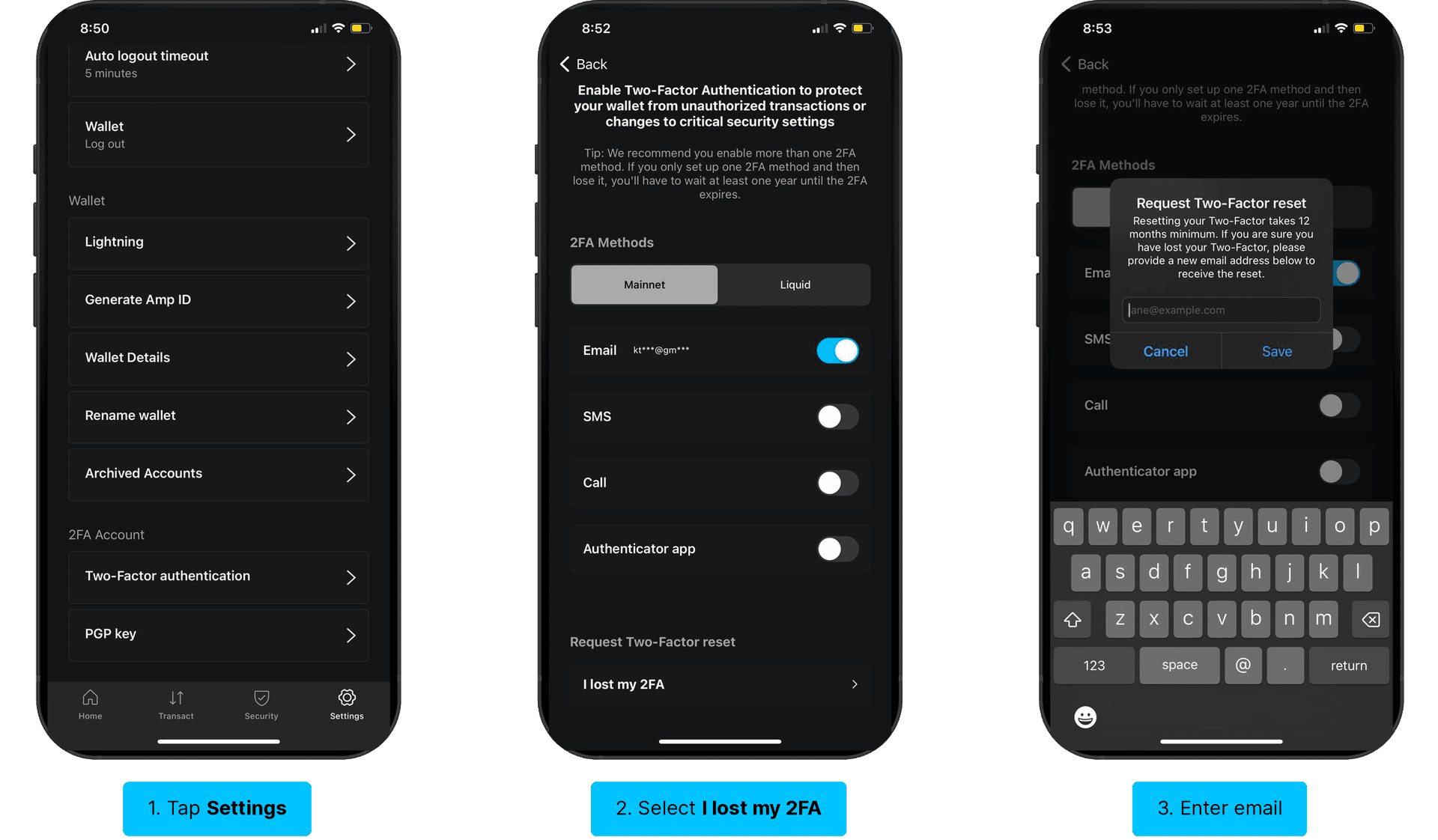
Open the Blockstream app and log in to the relevant 2FA-enabled wallet. Tap Settings in the navigation bar at the bottom of the screen, and scroll to Two-Factor authentication.
2.
Below 2FA Methods you will see a section titled Request Two-Factor reset. Select I lost my 2FA. In the window that pops up, enter an email address to use as your new 2FA method after the reset period is complete. Then, click Save.
Warning: Make sure you do not lose access to this email address. If you lose access to this email address, you will need to restart the 2FA reset and wait another 12 months.
Why Such a Long Waiting Period?
The long waiting period is a crucial security measure to prevent someone from accessing your wallet and using the 2FA reset feature to steal your funds. If you see a notification of a 2FA reset attempt that you did not initiate yourself, the waiting period provides you plenty of time to log in to your wallet and cancel the reset.
How Much Time Is Left on My Waiting Period?
After initiating a 2FA reset, you can check how many days remain on the waiting period in your wallet’s settings.
Can I Cancel the 2FA Reset?
Yes. If you have found one of your lost 2FA methods after requesting a reset, you can cancel the reset at any time.
Other Access Problems
If you are locked out for a reason other than a lost 2FA method, use the path that matches your situation.
You Forgot Your App PIN
The PIN unlocks the app on your device. If you forgot it but still have your recovery phrase, you can restore the wallet on the same device or a new one. Follow Restore wallet.
You Lost or Replaced Your Device
If you have your recovery phrase, install the Blockstream app on the new device and restore the wallet with Restore wallet. For more detail, see Lost device with wallet access.
You Lost Your Recovery Phrase
The recovery phrase is the only backup of a self-custodial wallet. If you lost it and can no longer open the wallet, the funds cannot be recovered by anyone, including Blockstream. If you can still open the wallet, back up your recovery phrase now and consider moving your funds to a freshly backed-up wallet. See Back up wallet.
Still Need Help?
The fastest way to reach support is from inside the app, because the report includes your logs. Open the app, go to the Settings tab, tap Support, enter your email and a short description of the issue, keep Share Logs checked, and tap Submit. See Submit log data for troubleshooting.
If these steps do not resolve the issue, you can also submit a request on the Help Center. Include the Blockstream app version, your device model and operating system version, which situation matches yours, and the exact wording of any error message (a screenshot helps).
Do not include your recovery phrase, PIN, or any 2FA codes. Support will never ask for them.